VibeStudio
The desktop app for editing specs and running the compiler locally.
Overview
VibeStudio is a Tauri-based desktop application that gives you a local editing environment for your VibeHub projects. It's designed for the day-to-day workflow of writing specs, previewing generated code, and syncing with the web.
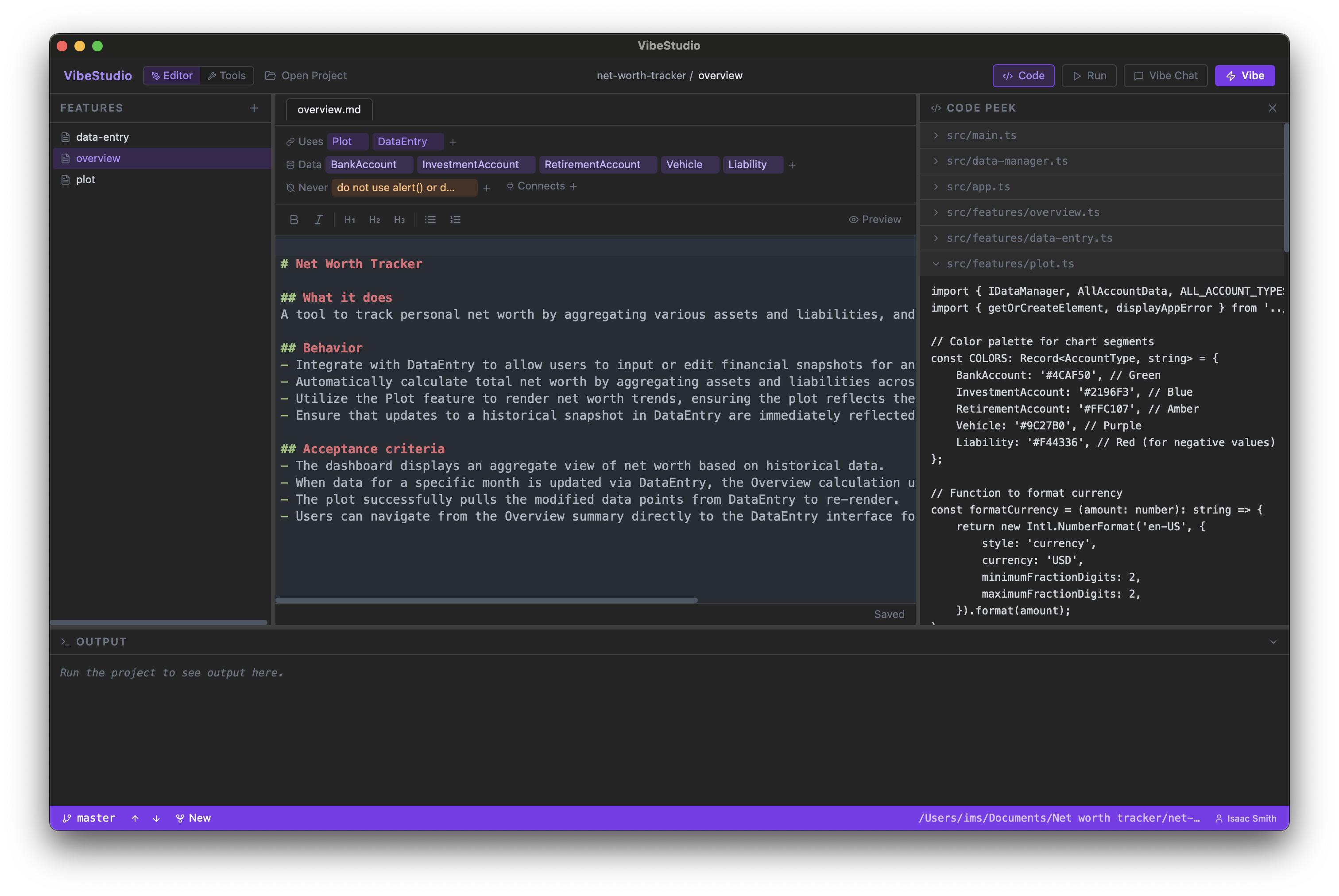
VibeStudio is available for macOS. Download the latest release or install the CLI:
Features
Spec Editor
Edit feature specs in a dedicated markdown editor with syntax highlighting for the .vibe frontmatter format (Uses, Data, Never, Connects). The editor lives in the main panel — click any spec in the left sidebar to open it. Changes are saved automatically.
Code Peek
Toggle Code Peek in the top bar to see the generated source files alongside your spec. VibeStudio reads mapping.json to resolve which files belong to each feature, so you can instantly see how your plain-English spec translates into working code.
Top Bar Abstractions
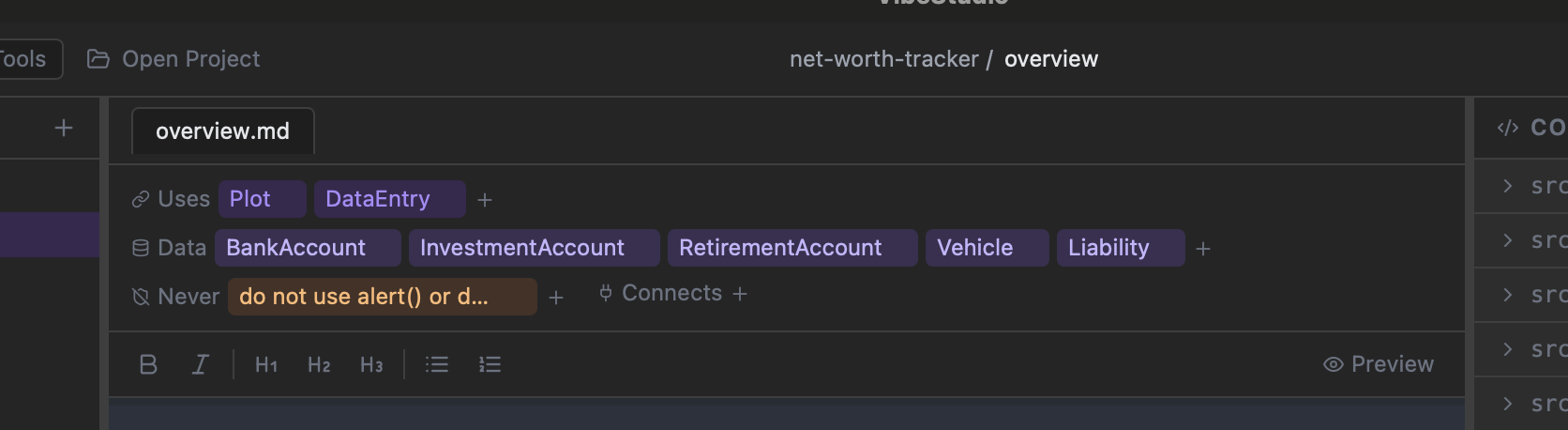
The top bar surfaces the key abstractions from your spec — Data models, Uses (dependencies), and Never (constraints) — as clickable pills. This gives you an at-a-glance view of what a feature touches without scrolling through the markdown.
Local Compile
Click the Vibe button to run the AI compiler on your machine. Choose your model from the dropdown (Gemini, Claude, GPT), watch the four-phase progress (codegen → typecheck → tests → validation) in the output panel, and iterate without pushing to the cloud.
Dev Server
Start your project's dev server directly from VibeStudio by clicking the play button. It reads your project.json to determine the right command (npm run dev, etc.) and streams output in the bottom panel.
Push & Pull
Sync specs with VibeHub using the push/pull buttons in the top bar. Push creates an update (like a PR) on the web for your team to review. Pull fetches the latest specs from the remote and commits them to your local .vibe/ directory.
Chat Sidebar
Open the chat panel to ask the AI questions about your project, get suggestions for spec improvements, or debug compilation issues. The chat is context-aware — it knows about your specs and generated code.
Download
Download the latest VibeStudio DMG from the download page, or install the CLI:
curl -fsSL https://getvibehub.com/install.sh | shWindows and Linux desktop builds are coming soon.
Authentication & API Keys
VibeStudio has no secrets or API keys built in — it's a thin client that authenticates against the VibeHub web backend. The only config compiled into the app is the web URL (https://getvibehub.com).
Sign-in flow:
- Click Sign in in VibeStudio — this opens your system browser to the VibeHub web app.
- Authenticate with Google OAuth on getvibehub.com.
- After login, the web backend issues a long-lived bearer token (valid for 365 days) and redirects to a
vibehub://auth?token=...deep link, which hands the token back to VibeStudio. - VibeStudio stores the token locally. On future launches, it's used automatically — no need to sign in again until it expires.
Provider API keys:
When the cloud agent compiles your specs, it needs API keys for the AI provider (Anthropic, Google, OpenAI). These keys are configured in your account settings on the web app — not in VibeStudio itself. Keys are encrypted at rest (AES-256-CBC) and never sent to the desktop app. VibeStudio calls the web backend, which decrypts and uses your keys server-side.
If you haven't configured your own keys, the platform's default Gemini keys are used with reduced concurrency limits (1 active compile vs. 3 for BYOK users).
In short: sign in once via the desktop app, configure your API keys on the web, and VibeStudio uses them transparently through the backend.
Local Config
Each project's connection to VibeHub is stored in .vibe/remote.json:
{
  "owner": "your-handle",
  "repo": "my-project",
  "webUrl": "https://getvibehub.com"
}
This file is created automatically when you clone a project or connect an existing project to VibeHub. It tells VibeStudio (and the CLI) where to push and pull specs.
The owner field must match your authenticated account. The server rejects pushes where the token's user doesn't match the project owner, preventing unauthorized modifications.
Workflow
- Open a project — Point VibeStudio at a directory with a
.vibe/folder, or clone from VibeHub. - Edit specs — Use the editor to modify features. The sidebar shows all specs in your project.
- Compile — Hit compile to generate code. Watch progress in the output panel.
- Preview — Start the dev server to see your changes live. Use Code Peek to inspect generated files.
- Push — When you're happy with the specs, push to VibeHub to create an update for review.